Story TV's low-cost trial is an easy way to try premium dramas. But the trial auto-renews into a paid plan, and many users on Google Play say they were charged ₹399 or ₹549 even though they "cancelled". In almost every case, the reason is the same. They stopped the plan in the app but didn't remove the autopay mandate from their UPI app or bank.
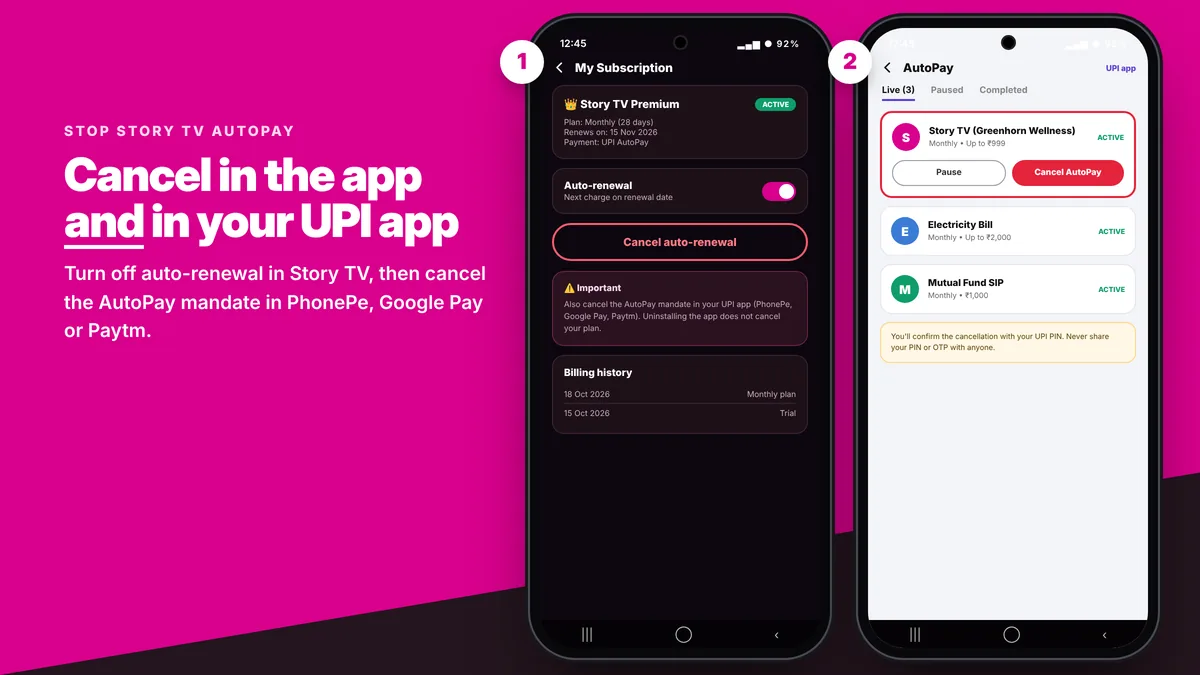
Story TV's own refund policy says users "are responsible to cancel the recurring payments or auto-pay mandates for the respective payment method". In practice, that means you need to do two things:
- Cancel auto-renewal of the plan (in the Story TV app, Google Play or the App Store), and
- Cancel the autopay mandate in the payment method you used (PhonePe, Google Pay, Paytm, BHIM, or your card or bank).
Here's exactly how to do both.
Before You Start: When to Cancel
- Cancel before the renewal date. The trial lasts 3 days. Paid plans last 28, 84 or 360 days. If you cancel after the renewal goes through, Story TV won't refund that renewal.
- You keep access until the end of the period. Cancelling stops the next charge. It doesn't end your current plan.
- Uninstalling the app does NOT cancel the subscription or the mandate.
Step 1: Cancel Auto-Renewal in the Story TV App
- Open Story TV and sign in with the mobile number you paid with.
- Tap the Profile / Account icon.
- Open My Subscription (sometimes labelled Manage Plan).
- Tap Cancel auto-renewal and confirm.
- Take a screenshot of the confirmation. It's your proof if you're charged later.
Menu names can change between app versions, but the subscription option is always inside your profile.
If You Paid Through Google Play
- Open the Play Store and tap your profile photo (top right).
- Go to Payments & subscriptions → Subscriptions.
- Select Story TV.
- Tap Cancel subscription, choose a reason and confirm.
Step 2: Stop UPI Autopay (Most Important)
If you paid with UPI, Story TV set up a recurring UPI AutoPay mandate. Cancel it in the same app you paid with:
PhonePe
- Tap your profile picture (top left).
- Under payment settings, open AutoPay.
- Find the Story TV / Greenhorn Wellness mandate and tap it.
- Tap Cancel or Delete AutoPay and confirm with your UPI PIN.
Google Pay (GPay)
- Tap your profile picture and open Autopay.
- Under the Live tab, select the Story TV mandate.
- Tap Cancel autopay and enter your UPI PIN.
Paytm
- Search "Automatic Payments" in the Paytm app, or open it from your profile.
- Select the Story TV mandate and tap Manage → Cancel.
BHIM and other UPI apps
Look for UPI AutoPay or Mandates in the menu, open the active Story TV mandate and revoke it. If you can't find the mandate, check the UPI app you used when you paid, because that's where it was created. Your bank's app may also list active mandates.
Debit or credit card
Card mandates (e-mandates) can be cancelled from your bank's app or net banking under Standing Instructions / E-Mandates / Recurring Payments. You can also call your bank and ask them to block recurring charges from the merchant.
How to Cancel Story TV on iPhone
- Open Settings and tap your name.
- Tap Subscriptions.
- Select Story TV and tap Cancel Subscription.
App Store subscriptions are billed by Apple, so there's no separate UPI mandate to cancel unless you also paid Story TV directly.
Charged After Cancelling? Do This
- Collect proof: your cancellation screenshot, the debit SMS and the UPI transaction ID (UTR).
- Email Story TV support at [email protected] with your registered mobile number and the proof.
- If the charge was a duplicate or premium wasn't activated, you qualify under Story TV's refund exceptions. Read our Story TV refund guide.
- For unresolved issues, see the escalation options in our Story TV customer care guide.
Quick Summary
| You paid with | Where to cancel |
|---|---|
| UPI (PhonePe, GPay, Paytm, BHIM) | Story TV app + AutoPay section of your UPI app |
| Google Play billing | Play Store → Payments & subscriptions |
| Debit / credit card | Story TV app + bank's e-mandate settings |
| iPhone (App Store) | Settings → your name → Subscriptions |
Frequently Asked Questions
Does uninstalling Story TV cancel my subscription?
No. Uninstalling the app does not cancel auto-renewal or the UPI autopay mandate. You must cancel the plan and the mandate separately.
How do I stop Story TV autopay in PhonePe?
Open PhonePe, tap your profile picture, go to AutoPay, select the Story TV mandate and tap Cancel. Confirm with your UPI PIN.
Will I lose access immediately after cancelling?
No. Cancelling only stops the next renewal. You can keep watching until the end of the period you already paid for.
I cancelled but was still charged. Can I get my money back?
Story TV doesn't refund renewals if you cancel after the renewal date. Duplicate charges and failed activations are eligible, so email [email protected] with your transaction ID and screenshots.